
To manage your Apexhost services, domains and hosting plans:
Once you have logged into the Apexhost client area (See Logging into the Client Area) you can manage the following:
* Edit your details.
* Change your Client Area password
* Change your Control Panel passwords
* Manage your Invoices
* Mass Pay all Outstanding Invoices
* Manage your Products
* Manage your Services
* Manage your Domains
* Manage your Quotes
* Manage your Emails
* Manage your Tickets
* Manage your Contacts
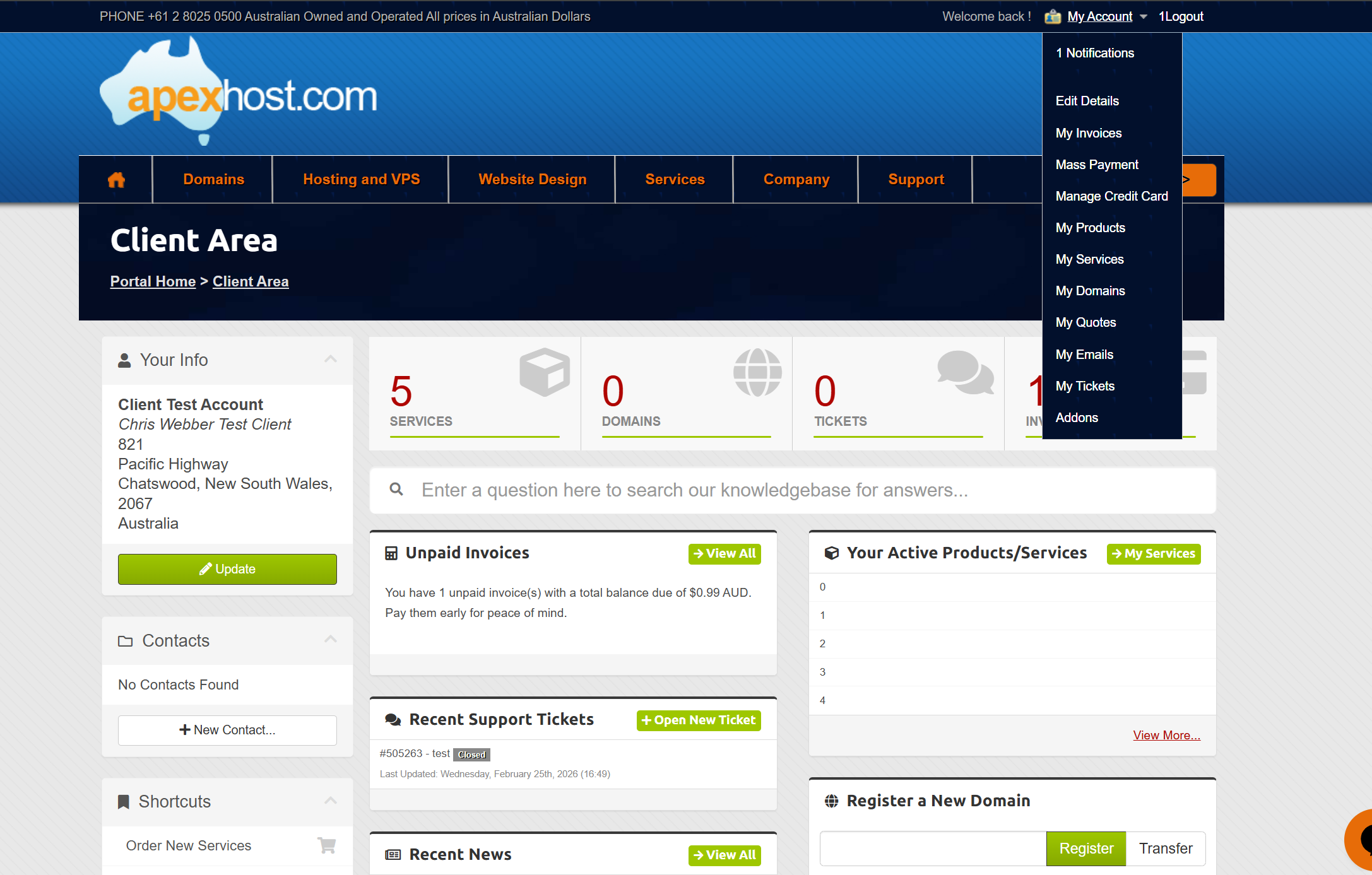
Any pages that allow you to manage the above have been comprehensively listed below. These can be accessed by hovering your cursor over My Account (Top RHS) in the Client Area.
FIND 'MY ACCOUNT'
Once you have logged into the Client Area, you can find all of the above in the My Account menu at the top RHS of the page as per the below image.
EDIT YOUR DETAILS
In the Edit Details page you can:
* Change your contact details
* Change you sub accounts (if used)
* Change contacts (if used)
* Change Credit Card details
(You can also access this page by selecting Manage Credit Card in the My Account (top RHS) menu)
* Change your client area password.
* Change your client area security questions.
MANAGE YOUR INVOICES
In the My Invoices page, you can manage, view, pay and print your Apexhost invoices.
MASS PAY INVOICES
In the Mass Pay page, you can view, pay and print the total outstanding amount you owe Apexhost in one payment.
MANAGE YOUR PRODUCTS/SERVICES
In the My Products & Services page, you can manage any hosting services or products you have with Apexhost.
From this page you can access and manage your hosting services and products you get from Apexhost.
If you want to login to your SolidCP or cPanel control panels, select the Windows/Linux hosting service, scroll down on the next page and select Login to Control Panel (One-Click Login). You may have to open it twice if it doesn’t come up the first time.
MANAGE YOUR DOMAINS
In the My Domains page, you can manage any domains you host with Apexhost.
You can set auto renew options, register nameservers, renew the domain name, view contact details, and get the EPP code if transferring away (for AU domains).
MANAGE YOUR QUOTES
In the My Quotes page, you can view quotes on special services or products like dedicated servers or co-Location
MANAGE YOUR EMAILS
In the My Emails page, you can see all system emails Apexhost has sent to you and or system renewal reminders, tickets, receipts, etc.
MANAGE YOUR TICKETS
In the My Tickets page, you can view and manage the tickets you have with Apexhost.